- Plugin
- Build
- Server
- Agent
- Bots
- API
Signed, rendered and kept
The tool runs on your PC or your CI runner. Paste an OAKMONT API key into Settings > OAKMONT and four jobs go to OAKMONT: it writes storyboards, renders shorts, signs measurements and keeps the run history. Without a key every test still runs, just none of these.
- Storyboard
A storyboard from one sentence
Type what should happen: two players find a diamond, a creeper blows everything up. OAKMONT writes the filming storyboard, the tool checks it against what its bots can do, and the bots act it out while a camera bot films. A board that fails the check goes back once with its errors.
- Cloud render
The short, rendered for you
The tool films on your PC and uploads the takes. OAKMONT renders the vertical short and the MP4 comes back, so no render kit is needed on your machine. Its editor can also cut on what happened in the game, explosions, deaths and chat, with captions, game sound and the music on the hits, and takes changes in plain words. Paid in OAKMONT AI minutes, and a failed render costs nothing.
- Signed
Proof anyone can check
Load tests, hosting plan numbers, the anticheat bench, the version matrix, the update gate and the first-minutes audit each write a measurement. OAKMONT signs it and gives it a public verify page, a live badge for a SpigotMC or BuiltByBit page and a share card. The badge carries its date and goes grey after 30 days.
- History
Every run, one list
Each scenario run goes to your OAKMONT account with its failed steps, from a desktop or a CI job. The IgniteTestTool panel in the OAKMONT portal shows flaky steps, failures by deploy, signed results, AI minutes and renders.
 Ignited Studios makes the tool. OAKMONT signs, keeps the copy and runs the verify page. Both have the same owner, so a signature proves a report was not changed after it was issued. It is not an independent review.IgniteTestTool on OAKMONT
Now in your JUnit run
The engine behind CI mode, as a test dependency of your plugin. A scenario file becomes a test per group in the IDE, steps can be written in Java next to your unit tests, and every test leaves the log of what the bots did.
Every group a test
@ScenarioTest runs a scenario file once and puts each of its groups in the IDE's test tree. A failed group names the step that broke and why; a group the run never reached is skipped with the failure that stopped it.
Steps in Java
ScenarioBuilder writes the same steps a file holds: join, chat, expectChat, click, groups, loops, steps as another bot. Any other step goes by its file name. verify fails the test with where the bot was and the last lines it saw.
A log per test
Each run leaves its transcript under build/itt: every step, every chat line the bots got and the server logs you name, in order with times. The path lands in the test report, so a failure comes with its proof.
@IgniteTest(port = 25600, scenarios = "src/test/itt")
class FlightTest {

  @ScenarioTest("flight.yml")
  void flight(GroupResult group) {
  }

  @Test
  void flyInWilds(Ignite ignite) {
    ignite.verify(scenario("fly", "TstAnn")
        .join()
        .group("8.1 /fly in the wilds", steps -> steps
            .chat("/fly")
            .expectChat("Flight on")));
  }
}Eight jobs, one tool
What people use it for, each acted out on a screen with what the tool prints when it does that job.
- Join the server
- Type the command /shop
- A menu opens: Shop
- Click Diamond Sword
- Chat shows Bought
Every release replays the same steps and checks every answer. A broken menu fails the run, not your players.
How it worksPlay the bot, or a real client you took over. Commands, menus and clicks turn into steps you can read.
How it worksOne command in, every menu it leads to out, laid out slot by slot and compared after a change.
How it works- close_mid_click slot 32
- right slot 84
- key 2 on slot 84
- offhand_swap slot 51
The fuzzer clicks every slot every way a client can and hands back the clicks that multiply an item.
How it worksFill the server with bots that do real things and read TPS, MSPT and how long a menu takes to open.
How it worksHours of play in one run while server memory is watched for the slow climb.
How it works- [INFO] Soak_2 issued server command: /is
- [INFO] TPS from last 1m: 20.0
- [WARN] Could not pass event InventoryClickEvent
- [INFO] Alice joined the game
- [INFO] Load_1 issued server command: /zombies
- [INFO] Soak_2 issued server command: /is
- [INFO] TPS from last 1m: 20.0
- [WARN] Could not pass event InventoryClickEvent
- [INFO] Alice joined the game
- [INFO] Load_1 issued server command: /zombies
Server errors grouped by plugin, next to the scenario step that was running when they hit.
How it works- Build
- Swap
- Restart
- Run
1 run(s), 0 failed
Build, swap the jar, restart, run the suite and post the result to Discord or fail the CI job.
How it worksOne run, end to end
The strip across the top of the tool is the signal chain. Each link has a lamp, so it is always clear where a run stops: grey off, amber working, green up, red failed.
- PluginPoint it at your plugin's project and its build command. The Gradle wrapper is handled for you.
- BuildBuilds the jar and swaps it into the test server's plugins folder.
- ServerStarts Paper, watches the console and groups every error by plugin.
- AgentA small server plugin that answers what bots cannot see: health, entities, blocks, data.
- BotsReal players over the protocol, one or a swarm, offline or premium accounts.
- APIEverything the window does, over HTTP, for scripts, agents and CI.
Record it once
Press Record and play the bot, in the tool or in a real Minecraft client. Commands, menus and clicks turn into steps written as sentences; in Minecraft, item use, blocks, hits and walking too. Add a check for the open menu, an item in it or a chat line while you go. Drag steps, make sections, turn a value into a variable that runs once per arena.
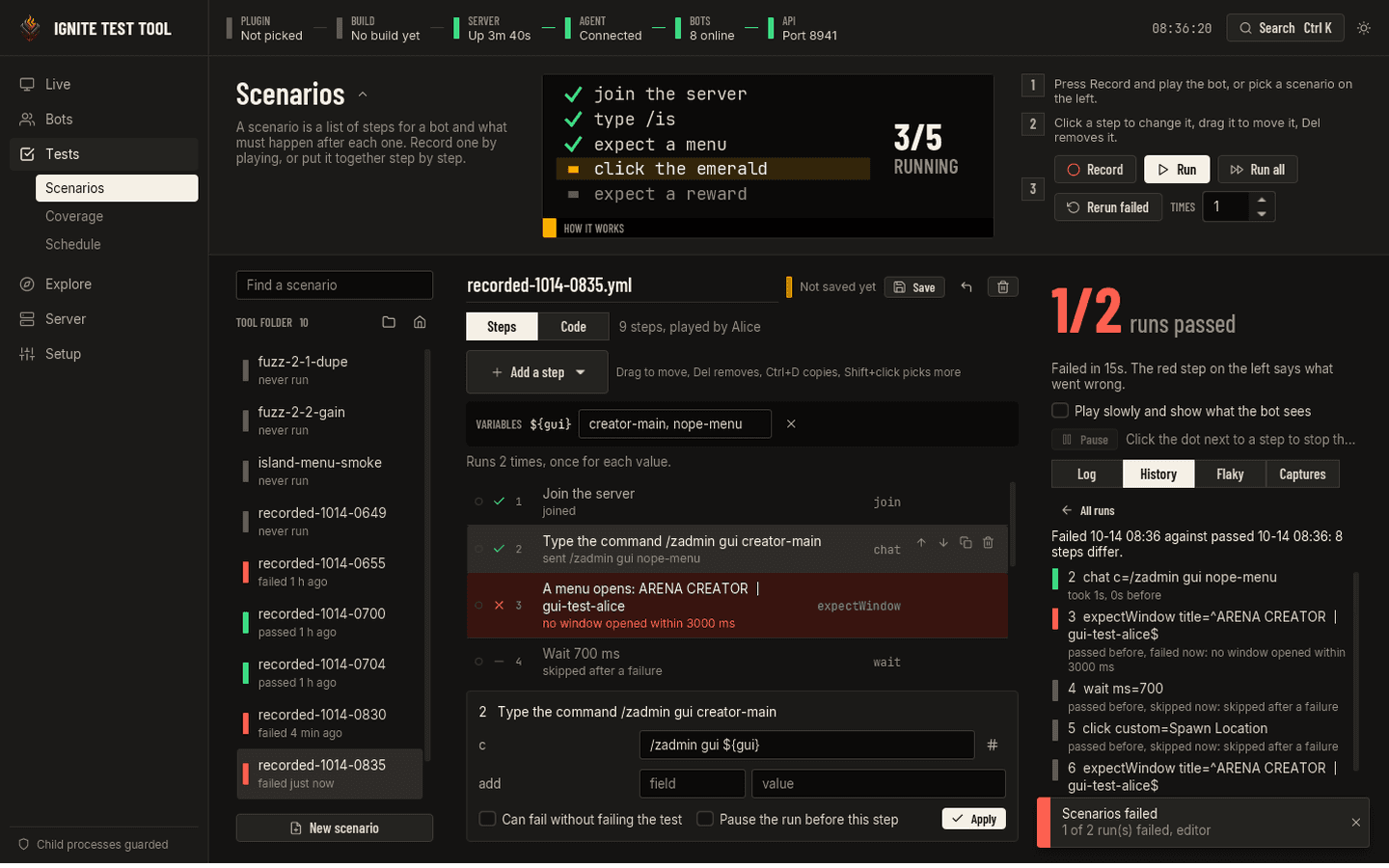
See what changed
A failed run is set against the last pass: which step broke, why, what got slower. Breakpoints stop a run on any step and slow play shows what the bot sees.
Break the menus
The crawler maps every menu one command opens. The fuzzer clicks every slot every way a client can and hands back a dupe as the exact clicks behind it, with a repro scenario.
Run it without you
Load and soak runs say in one line whether the server holds. The Schedule posts nightly results to Discord. In CI the same scenarios run headless, write JUnit XML and an HTML report, and fail the job.
- name: Run the scenarios
  run: >
    java -jar itt.jar
    --run-scenario tests/scenarios
    --server-dir server --start-server
    --junit build/itt/junit.xml
    --timeout 10m
20 screens, one window
Six rooms down the left of the window. Every screen has a sheet in the wiki.
Server
- ProcessesServer, clients and commands with their RAM
- ConsoleThe server console with history
- DeployBuild, swap the jar, restart, rerun
- AgentServer-side state, A/B diff, RCON
- WatchServer errors grouped by plugin
- CheckpointsSave plugin data, restore it before a test
- GhostsLeftover processes found and stopped
Four ways to pay
Prices in EUR.
- Monthly69.99EUR a monthBilled every month
- Three months150EUR every 3 months50 EUR a month
- Yearly300EUR a year25 EUR a month
- Lifetime999.90EUR oncePaid once
Questions, answered
What plugin developers ask before they buy.
Everything, written down
The wiki has 47 sheets: every screen, every scenario step, every CI flag and every API route.
Guides and comparisons
Longer reads that use this plugin to answer one question.
- GuideTest a Paper plugin with real bots, locally and in CIIntegration-test a Paper plugin with bots that join a real server: scenario files, a JUnit 5 extension and a GitHub Actions job that fails on a broken menu.
- ComparisonIgniteTestTool vs MockBukkitIgniteTestTool and MockBukkit compared: real Paper server and protocol bots against a mock server in JUnit. What each tests, what it needs, and when to use both.